OVERVIEW
Inside the pack.
Prepare large Unreal Engine asset packs with confidence.
VISUALS
Images & Videos
PRODUCT INFORMATION
Details & Specifications
Prepare large Unreal Engine asset packs with confidence.
Get started with confidence by consulting the Official Documentation, which provides complete installation instructions, recommended setup steps, detailed workflow guidance, and troubleshooting information.
NEXFORGE — Asset Pack Prep is a professional Editor Code Plugin for Unreal Engine 5.8, designed for environment artists, technical artists, asset creators, and marketplace publishers who need to inspect, organize, validate, and prepare packs containing dozens or hundreds of assets.
WORKFLOW
Select Pack → Scan → Diagnose → Batch Prepare → Validate → Ready
PACK WORKSPACE & SCANNING
• Create a named workspace and select one precise /Game root folder.
• Scan only the chosen pack recursively, with configurable ignored folders.
• Use a registry-first strategy to avoid unnecessary full asset loading.
• Review total assets, inspected assets, Ready, Warning, Error, Unclassified, geometry, texture, scan-duration, and readiness summaries.
• Long operations expose progress and cancellation when the current stage can stop safely.
PROFESSIONAL PACK INSPECTOR
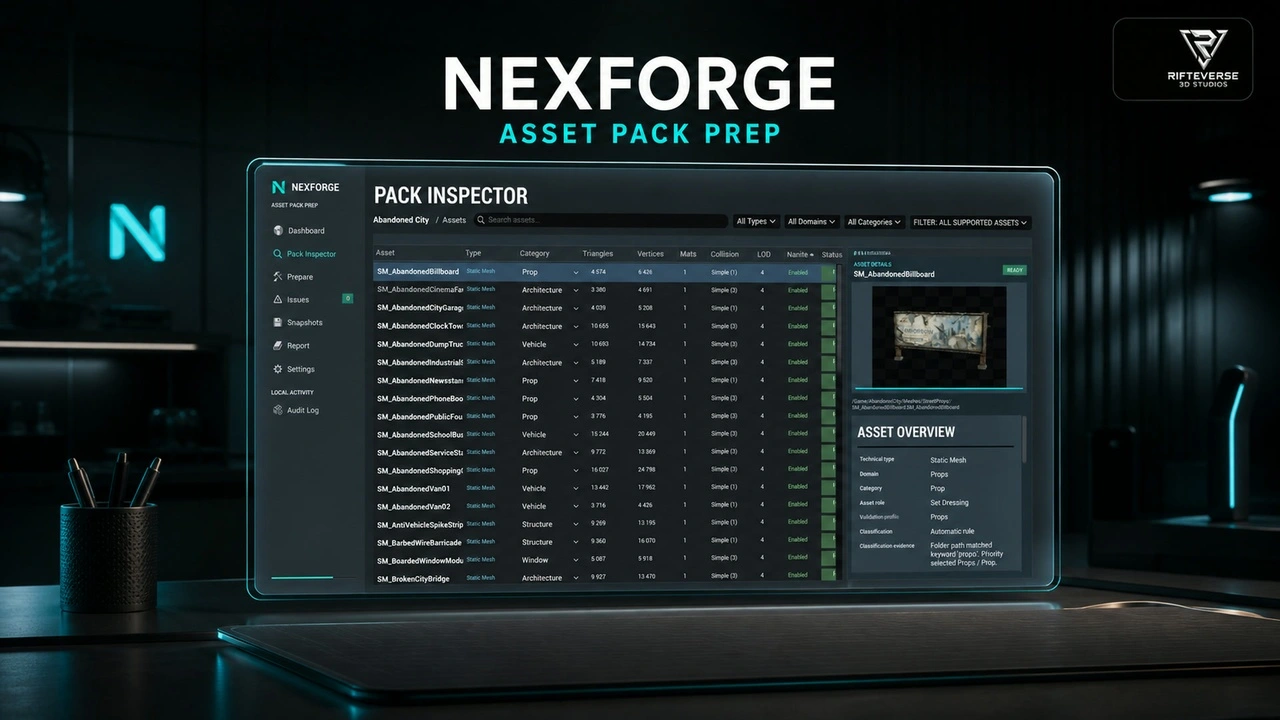
• Search, sort, and filter large asset collections from one dockable Unreal Editor window.
• Filter Ready, Warning, Error, Missing Collision, Missing Material, Missing LOD, Naming Issue, Nanite Disabled & Enabled, and Unclassified records.
• Inspect asset identity, technical type, category, path, triangles, vertices, materials, collision, LODs, Nanite state, dimensions, naming, and validation status.
• Open detailed mesh records with thumbnails, geometry statistics, material and texture references, collision details, LOD information, dimensions, and complete diagnostic evidence when available.
SUPPORTED TECHNICAL TYPES
• Static Mesh, Skeletal Mesh, Skeleton, Animation Sequence, Animation Montage, Blend Space, Physics Asset, Control Rig, IK Rig, and IK Retargeter.
• Static Mesh preparation is the most complete operational workflow in this release. Other supported types contribute classification, naming, reference, profile, and validation information when reliable metadata is available.
DETERMINISTIC CLASSIFICATION
• Classification uses asset names, prefixes, suffixes, folder paths, technical types, configurable keywords, rule priority, and stored manual overrides.
• Supported domains include Environment, Character, Creature, Vehicle, Weapon, Props, Animation, and Other.
• Categories cover architecture, walls, floors, ceilings, doors, windows, stairs, pillars, furniture, props, decoration, structures, clothing, hair, body parts, creatures, animals, vehicles, vehicle parts, weapons, projectiles, equipment, tools, containers, food, electronics, nature, animation, rigs, and more.
• Every classification result remains reviewable, and users can assign a manual category when project context requires it.
EXPLAINABLE VALIDATION
• Each diagnostic identifies the asset, severity, rule, problem, detected value, expected value, evidence, suggested solution, fixability, risk level, operation, and Undo support.
• Validation covers naming, classification, geometry metadata, materials, collision, LOD policy, Nanite state, skeletal references, and animation data where applicable.
• Ready, Warning, and Error severities are driven by project settings rather than a universal hardcoded policy.
CONTROLLED BATCH PREPARATION
• Analyze Only: build and inspect plans without modifying assets.
• Guided Preparation: explicitly select the actions appropriate for the pack.
• Prepare All Safe Fixes: automatically select only deterministic, executable, conflict-free Safe actions, followed by a complete preview and confirmation.
• Supported Static Mesh workflows include naming proposals, organization previews and moves, Nanite enable/disable actions, guarded simple-collision generation, and controlled LOD generation.
• Missing or artistically ambiguous material assignments remain Manual Only instead of receiving an arbitrary replacement.
SAFETY-FIRST EXECUTION
• Scanning and plan construction are read-only.
• No asset deletion is performed by NEXFORGE.
• Important batch operations show Current Value → Proposed Value before execution.
• Existing collision is not silently replaced, developed LOD chains are guarded, rename and move conflicts are detected, and unsupported artistic choices remain manual.
• Results are reported per asset as Succeeded, Failed, Skipped, or Cancelled, with detailed audit information and save verification.
• Unreal transactions and Undo visibility are reported per supported operation.
PACK READINESS & ISSUES
• Review Naming, Materials, Collision, LOD, Organization, and Validation pillars.
• Overall readiness is calculated deterministically from applicable checks and configurable weights.
• The Issues page provides an actionable queue with Select All Fixable and controlled Fix Selected workflows.
SNAPSHOTS, REPORTS & AUDIT
• Save local pack snapshots containing asset identity, paths, categories, technical statistics, status, readiness, warnings, and errors.
• Compare with the latest compatible snapshot to identify new assets, removed assets, reliably modified assets, new issues, and resolved issues.
• Export detailed CSV and JSON reports, plus timestamped audit history for production review and traceability.
CONFIGURABLE PROJECT POLICY
• Configure naming prefixes, category vocabularies, ignored folders, organization destinations, collision requirements, LOD targets, Nanite warnings, skeletal and animation expectations, validation severities, and readiness weights.
• Project-specific settings can override plugin defaults so teams can enforce their own production standards.
COMPATIBILITY & SCOPE
• Unreal Engine 5.8.
• Windows 64-bit Unreal Editor.
• Editor-only Code Plugin; it does not add gameplay systems to packaged applications.
• All workspace data, snapshots, reports, and audit records remain local to the project.
For faster support, please include your Unreal Engine version, NEXFORGE version, reproduction steps, and any relevant screenshot or Output Log excerpt.
Support
For questions or technical assistance, email support@rifteverse.com or open a ticket in the Support tab. We will respond very quickly.
Unreal Engine · TECHNICAL DETAILS
NEXFORGE is a professional editor-only C++ and Slate extension for Unreal Engine 5.8, designed for large asset-pack preparation and quality-control workflows.
TECHNICAL ARCHITECTURE
• Three Editor modules: NexForgeCore, NexForgeValidation, and NexForgeEditor.
• Precompiled Windows 64-bit binaries and complete C++ source are included.
• 23 C++ classes and 0 Blueprints.
• Uses Unreal Engine Editor APIs, Asset Registry, AssetTools, Slate, and project-local configuration.
• No external runtime libraries, cloud service, or required telemetry.
INSTALLATION AND USE
• Install through store for Unreal Engine 5.8, enable NEXFORGE, restart Unreal Editor if requested, and open the dockable NEXFORGE window from the Tools menu.
• Editor-only: it does not add runtime gameplay systems to packaged applications.
SAFETY AND PERFORMANCE
• Registry-first scanning avoids unnecessary full asset loading.
• Batch actions display exact Current Value → Proposed Value previews before execution.
• No automatic asset deletion. Existing collision and developed LOD chains are protected.
• Unreal transactions and Undo are used when supported.
• Long operations provide progress, cancellation where safe, and detailed audit logging.
DOCUMENTATION
Official installation, workflow, settings, and troubleshooting guide: Official Documentation
Support
For questions or technical assistance, email support@rifteverse.com or open a ticket in the Support tab. We will respond very quickly.
COMMUNITY FEEDBACK
Pack Reviews
Visitor reviews collected on this site. Purchases are not verified against external stores or Unity.
No published reviews yet. Be the first to share your experience.