3D ENVIRONMENT
Orbital Frontier – Modular Space Station Exterior Kit
OVERVIEW
Inside the pack.
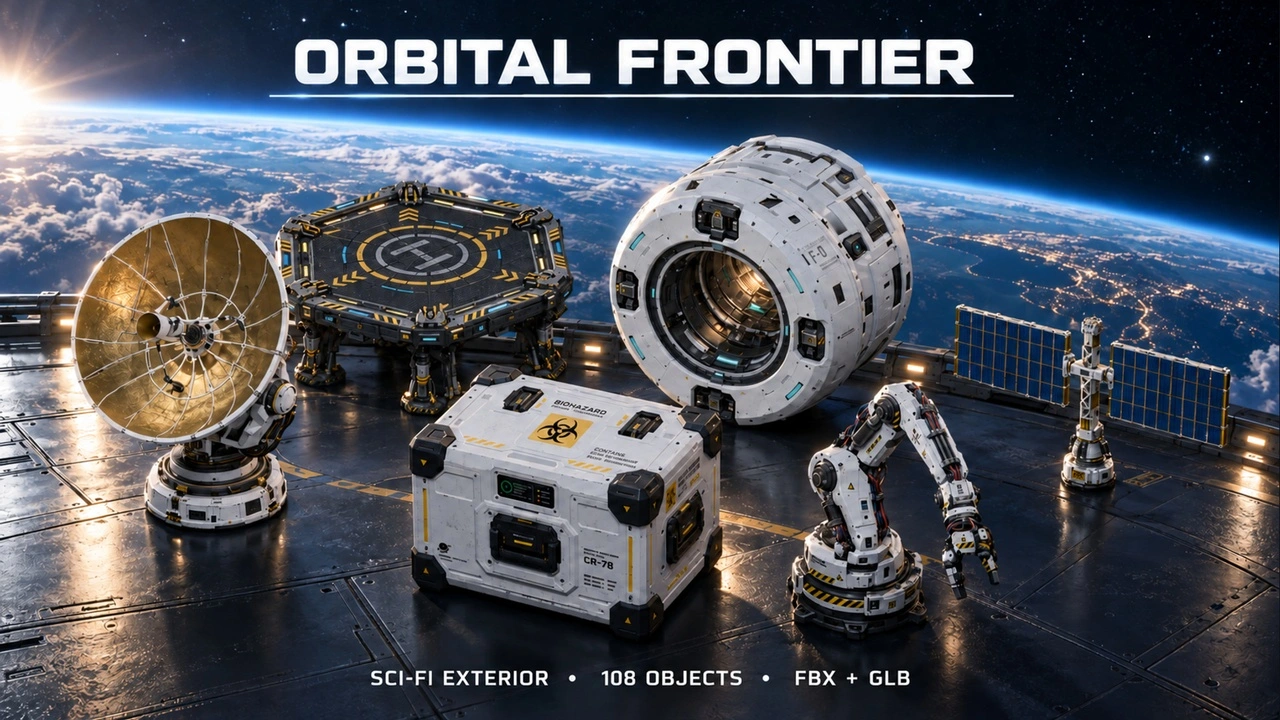
Build the outer world of a space station with 108 detailed static 3D assets. Orbital Frontier brings together station architecture, access structures, docking equipment, solar arrays, communication systems and industrial machinery for creating orbital facilities, research outposts and exterior science-fiction environments.
VISUALS
Pack Images
PRODUCT INFORMATION
Details & Specifications
ORBITAL FRONTIER – MODULAR SPACE STATION EXTERIOR KIT
Build the outer world of a space station with 108 detailed static 3D assets. Orbital Frontier brings together station architecture, access structures, docking equipment, solar arrays, communication systems and industrial machinery for creating orbital facilities, research outposts and exterior science-fiction environments.
Connect the visual story of your station from its habitat modules to its landing platform, maintenance areas and power infrastructure. Combine large structural elements with antennas, sensors, cargo, service equipment and warning lights to create exterior spaces with a clear function and a consistent industrial character.
Every object is supplied in FBX and GLB with a detailed base model and three additional levels of detail: LOD1, LOD2 and LOD3. Material textures, a second UV channel for lightmap workflows and convex collision geometry are included.
BUILD YOUR OWN ORBITAL FRONTIER
Station architecture: arrange corridors, wall and roof pieces, windows, hubs, habitats and research structures into your own exterior layouts.
Docking and access zones: dress landing platforms, docking interfaces, airlocks, catwalks, ladders and maintenance routes.
Power and thermal systems: combine solar arrays, reactors, radiators, transformers and cryogenic equipment to give your station a believable operational purpose.
Exploration and cinematic scenes: create remote research facilities, industrial orbital installations and spacecraft service areas with layered technical detail.
ASSETS INCLUDED
Habitats and major structures: central hub, research biodome, outpost habitat, maintenance bay, observation tower and landing platform.
Corridors and architectural pieces: straight, corner, short, end, junction, transition and vertical corridor variants; solid, reinforced, technical, window and corner wall pieces; flat and angled roof panels; foundation panel, structural arch and support pylon.
Access and walkways: airlock door and controls, catwalk sections, corners, junctions, crossroads, railings, stairs, supports and ladders.
Docking and external connections: docking ports, docking clamp, docking laser, magnetic collar, umbilical conduit, expansion joint, cable conduit and RCS thrusters.
Power and thermal equipment: fusion reactor, capacitor bank, power transformer, solar panel variants, radiator fins, thermal radiator, heat exchanger, coolant equipment and exhaust duct.
Communication and observation: communication dishes and mast, telecom tower, orbital scanner, radar dome, sensor mast, sensor gimbal, radiation sensor, navigation beacons and security camera.
Cargo, fluids and service equipment: containers, vacuum crate, pallet, cargo transport, cryogenic units and tanks, sample container, nitrogen tank, oxygen cylinder, fluid transfer pump and pressure manifold.
Robotics, EVA and lighting: robotic arm, claw tool, laser tool, inspection drone, EVA suit locker, recharge station, toolbox, electromagnet, floodlights, runway light, spotlight and corner hazard light.
MAIN FEATURES
108 individual static assets covering exterior architecture, infrastructure and props.
Four detail levels per object: LOD0, LOD1, LOD2 and LOD3, supplied as separate files.
432 FBX render-model files with shared external textures.
432 GLB render-model files with embedded textures, plus 108 separate GLB collision files.
432 external texture maps in the FBX texture folder, with 4K Base Color maps and 2K/4K technical maps.
Two UV channels: material UVs and a separate packed lightmap layout.
Object-appropriate dimensions and pivots for placement, mounting and manual scene assembly.
Convex collision geometry included in the base FBX files and delivered separately for GLB.
Organized folders for base models, textures, LOD1, LOD2, LOD3 and GLB collisions.
TECHNICAL INFORMATION
Formats: FBX and binary glTF (.glb).
Geometry: static, triangulated meshes. Rigs and animations are not included.
Scale: dimensions harmonized in metres according to each object's intended use.
Pivots: positioned for floor placement, wall mounting, equipment attachment or central manipulation, according to the object.
Material workflow: metallic/roughness PBR with Base Color, Metallic and Roughness maps. GLB files use packed Metallic-Roughness textures.
External FBX textures: 108 Base Color maps at 4096 × 4096 in JPEG format and 324 PNG technical maps at 2048 × 2048 or 4096 × 4096. Normal maps are supplied for 100 objects; eight corridor assets use their supplied color and metallic/roughness maps without a normal map.
Embedded GLB color textures: 4096 × 4096 at LOD0, 2048 × 2048 at LOD1, 1024 × 1024 at LOD2 and 512 × 512 at LOD3.
Embedded GLB technical textures: LOD0 normal maps are 2K on 84 objects and 4K on 16 objects; base metallic/roughness maps are 2K or 4K. LOD1, LOD2 and LOD3 technical maps are 1024, 512 and 256 pixels respectively.
UV channels: UV0 for materials and UV1 for lightmaps. Lightmap layouts have been checked for overlapping and degenerate UV triangles.
Total render triangles across all 108 assets: LOD0: 12,560,487; LOD1: 7,623,265; LOD2: 4,270,997; LOD3: 2,502,506. These are collection totals, not per-model counts.
Collision geometry: 3,087 convex hulls across the collection. Base FBX files contain named UCX meshes; GLB collision meshes are supplied in a dedicated folder.
Uncompressed folder sizes: approximately 5.324 GB for the complete FBX folder, including textures, LODs and collisions; approximately 5.598 GB for the complete GLB folder, including all detail levels and collision files.
WORKFLOW NOTES
Assemble and dress your own station. Architectural pieces and equipment are supplied as individual models for manual arrangement. Adjust alignment and placement to suit your layout. LOD files are separate assets: assign switching distances in your destination application, with the lower detail levels intended for more distant views.
Configure collision behavior in the application or engine used for your project. GLB collision geometry requires assignment in the destination workflow. For FBX imports, keep the supplied texture folder available so external maps can be resolved. GLB render files contain their own textures. Set up materials, lighting and lightmap settings for your chosen renderer.
RIFTEVERSE 3D STUDIOS
Support
For questions or technical assistance, email support@rifteverse.com or open a ticket in the Support tab. We will respond very quickly.
FBX · TECHNICAL DETAILS
FRONTIER — FBX TECHNICAL DETAILS
108 unique static assets; 432 FBX files (LOD0–LOD3), 108 material designs and 432 external texture maps. Folders: FBX, TEXTURE, LOD1, LOD2, LOD3.
Geometry: per-object LOD0 range: 29,926–1,121,756 triangles; 41,669–2,031,985 exported vertices. Triangle totals: LOD0 12,560,487; LOD1 7,623,265; LOD2 4,270,997; LOD3 2,502,506. Triangulated meshes; collision excluded; vertex counts include UV/shading splits.
Textures: 108 Base Color JPEG maps at 4K and 324 technical PNG maps at 2K/4K, shared across LODs. Metallic/roughness PBR; OpenGL normal maps for 100 assets, none for 8 corridors. Keep TEXTURE with the models and relink maps if required.
UVs: UV0 for materials includes overlapping faces; separate UV1 for lightmaps. Entirely overlap-free UVs are not claimed.
Collision: 3,087 custom convex UCX hulls in the 108 base FBX files (1–77 per asset), totaling 240,412 triangles. Assign collision in the importer and hide helpers from rendering. Collision is not duplicated in LOD files.
Scale/pivots: metres; object-specific floor, mounting or central pivots. Largest dimension per base asset: 0.4–20 m. No single assembled-scene bounding box applies.
Setup: 3 additional LODs supplied separately; assign switching distances manually. No rigs, animations, characters, UDIM, vertex colors or custom shaders.
Support
For questions or technical assistance, email support@rifteverse.com or open a ticket in the Support tab. We will respond very quickly.
GLB · TECHNICAL DETAILS
FRONTIER — GLB TECHNICAL DETAILS
108 unique static assets; 432 render GLB files (LOD0–LOD3) plus 108 collision GLB files: 540 files total. 108 material designs.
Geometry: per-object LOD0 range: 29,926–1,121,756 triangles; 41,669–2,031,985 exported vertices. Triangle totals: LOD0 12,560,487; LOD1 7,623,265; LOD2 4,270,997; LOD3 2,502,506. Triangulated meshes; collision excluded; vertex counts include UV/shading splits.
Textures: 1,264 embedded images across all LODs. Base Color + packed Metallic-Roughness (G=roughness, B=metallic); OpenGL normals on 100 assets, none on 8 corridors. Base Color: 4K/2K/1K/512 at LOD0/1/2/3. Technical maps: 2K–4K at LOD0; 1K/512/256 at LOD1/2/3.
UVs: UV0 for materials includes overlapping faces; separate UV1 for lightmaps. Entirely overlap-free UVs are not claimed.
Collision: 3,087 custom convex hulls in 108 separate files, 240,412 triangles total. Import matching COLLISION files and assign collision in your application; hide helpers from rendering.
Scale/pivots: metres; object-specific floor, mounting or central pivots. Largest dimension per base asset: 0.4–20 m. No single assembled-scene bounding box applies.
Setup: 3 additional LODs supplied separately; assign switching distances manually. No rigs, animations, characters, UDIM, vertex colors or custom shaders.
Support
For questions or technical assistance, email support@rifteverse.com or open a ticket in the Support tab. We will respond very quickly.
COMMUNITY FEEDBACK
Pack Reviews
Visitor reviews collected on this site. Purchases are not verified against external stores or Unity.
No published reviews yet. Be the first to share your experience.
EXPLORE THE COLLECTION
Related packs
More from the same themes in the collection.